🛡️ Android Toddler Lock & Screen Shield
Your Phone.
Their Screen.
KidLatch helps keep toddlers inside the app you choose without accidental taps, deleted apps, or runaway settings. Complete containment in one effortless tap.
🔒 Zero Ads · 100% On-Device Privacy · No Root Required
THE TODDLER TAKEOVER
Toddlers Are Great At
Escaping Apps.
One tiny swipe is all it takes to derail their video, disrupt phone settings, or send accidental messages.
Pulling Down Notifications
An errant top-edge swipe opens the shade, exposing private alerts and actionable system banners.
Turning Off Wi-Fi
Quick tiles get tapped, killing the stream immediately and triggering an instant toddler meltdown.
Exiting Their Video Or App
Accidental home-bar gestures kick them to the home screen, demanding your intervention every two minutes.
Opening Random Settings
Bluetooth toggles, volume limits, and system configurations get jumbled with curious multi-touch fingers.
KidLatch lets you hand over your phone without handing over your whole phone.
HOW IT WORKS
3 Simple Steps
Set up foolproof digital boundaries in under ten seconds without locking down your entire phone.
01
Choose The App
Open YouTube Kids, PBS Kids, or any learning game your child wants to use right now.
02
Turn On KidLatch
Swipe down from your quick settings or tap the floating overlay to instantly engage the boundary latch.
03
Hand Over The Phone
Your child stays happily contained in their selected app with notifications, gestures, and settings fully secured.
ENGINEERED RELIABILITY
Control You Can
Trust
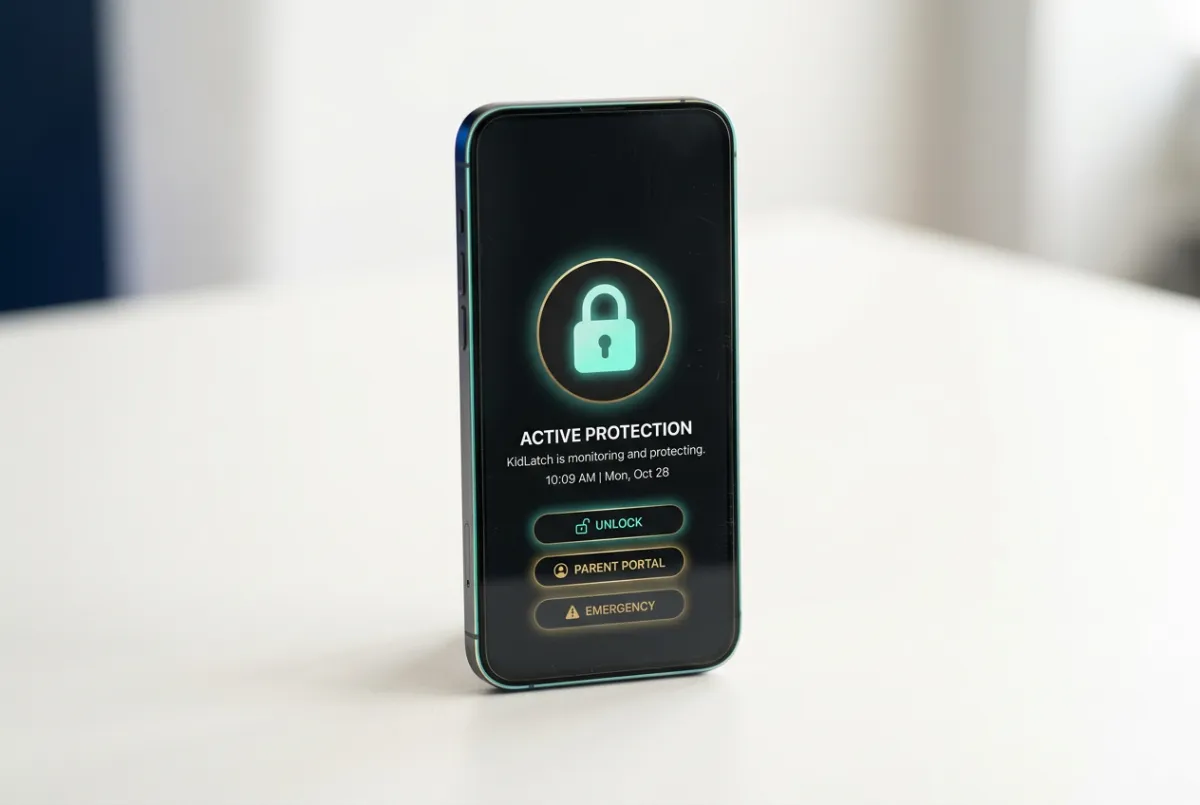
KidLatch transforms standard Android containment into an uncompromising, parent-managed sanctuary. Designed with hardware-level logic to keep toddlers safe and devices intact.
Keeps Kids Inside
Pins authorized apps firmly to the foreground. Navigation bars, system trays, and gesture exits remain completely locked against accidental escapes.
Helps Block Actions
Prevents unauthorized in-app purchases, deletion prompts, rapid volume overrides, and unwanted touch inputs with real-time barrier enforcement.
Parent-Controlled Release
Instant unlocking via your secure PIN, biometric sensor, or paired wearable. You regain complete control of your smartphone in a fraction of a second.
Privacy-Focused
Operates entirely on-device with zero cloud telemetry. Your family photos, browsing habits, messages, and work credentials never leave the phone.
REAL-WORLD DEMONSTRATION
See KidLatch In Action.
Experience how one smart overlay stops accidental exits, deleted files, and unexpected calls instantly.
▶ Watch a 45-second live walkthrough of lock activation and unlock gesture.
Without KidLatch
Toddlers can swipe away your video, open unapproved apps, dial emergency contacts, or delete vital documents in just a few chaotic taps.
With KidLatch
Those same taps and swipes stay contained. The active app plays uninterrupted while system navigation, volume controls, and notifications remain locked down.
🔒 Zero root access required · Instant unlock gesture for parents
LIMITED INVITATION
We’re Starting Small.
KidLatch is being slowly rolled out to just 100 families to ensure personal onboarding, hands-on feedback loops, and an uncompromising standard of child-proofing excellence. Join the list to secure lifetime founding perks and direct developer access.
OUR LONG-TERM ROADMAP
The App That Grows
With Your Child.
KidLatch starts by making shared-phone time calm and contained for parents of toddlers. As your child grows, KidLatch will grow with them: transitioning effortlessly from a touch-blocking guardrail into an intelligent, adaptive family companion that nurtures mindful digital independence at every developmental milestone.
TRANSPARENCY & SPECS
Common Questions
We designed KidLatch for privacy-first parents. Explore how on-device containment safeguards your Android system without intrusive permissions or cloud dependencies.
100% Local Device Architecture
KidLatch functions entirely offline without tracking scripts, accounts, or cloud processing. Your phone and media remain securely in your control.
What is KidLatch and how does it work?
KidLatch is an instant Android app containment utility. With a single tap or gesture, it locks your active video player or game to the front screen, intercepting system navigation, notification pulls, and accidental taps until you unlock it.
Does KidLatch collect, store, or transmit personal data?
No. KidLatch collects zero personal information, keystrokes, viewing history, or device telemetry. All containment logic runs strictly on-device through standard Android accessibility APIs with no background network transmission.
Do I need to register an account or provide an email?
No user account, profile setup, or password is required to run KidLatch. You install the app, grant the necessary on-device overlay permission, and it is immediately ready for everyday use.
Does KidLatch require an active internet connection?
Not at all. KidLatch operates 100% offline. Whether you are on an airplane, in a restaurant without Wi-Fi, or conserving mobile data, latching functions identically without internet access.
Which Android versions and manufacturers are supported?
KidLatch supports devices running Android 10 (API Level 29) through Android 15+. It is optimized for major manufacturers including Samsung Galaxy One UI, Google Pixel, Motorola, and Xiaomi devices.
Can a toddler bypass the latch with gestures or power buttons?
No. KidLatch blocks gesture navigation, status bar drag-downs, and home bar swipes. The screen can only be released via your configured secure pattern, custom multi-touch pin, or biometric authentication.
How is KidLatch different from standard Android App Pinning?
Native Android app pinning still allows status bar peeks, full touch within the app, and complicated button combinations that toddlers easily stumble upon. KidLatch adds full touch-freeze modes, childproof unpinning gestures, and seamless quick-activation tiles.
Does KidLatch drain battery life while running in the background?
KidLatch consumes near-zero standby power. It enters a lightweight sleep state when inactive and only activates its touch-interception layer during an active latch session.
FOUNDING 100 ACCESS
Ready To Hand Over Your Phone?
Without handing over your whole phone. Lock down apps, prevent accidental taps, and get your peace of mind back in seconds.
Instant Android setup • No credit card required • First 100 spots only
Intentional, calm digital containment engineered for modern parenting.
© 2026 KidLatch. All rights reserved. KidLatch is a property of Gramley Holdings, LLC.